1. Home
  2. VPS & Cloud Server
  3. Cara Melakukan Transfer Files via Remote Desktop

Cara Melakukan Transfer Files via Remote Desktop

Lakukan langkah-langkah berikut :

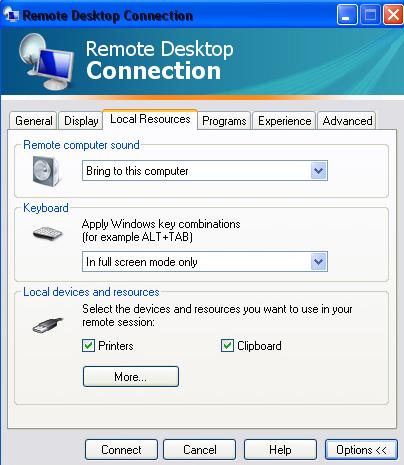
•    Pilih menu Remote Desktop Connection pada komputer anda
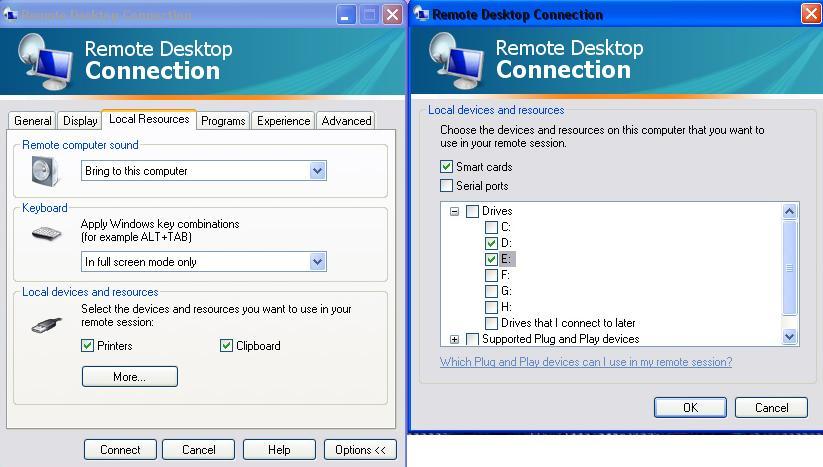
•    Pilih Option – Local Resource – More
•    Lalu Checklist jenis “drive” yang anda pilih.
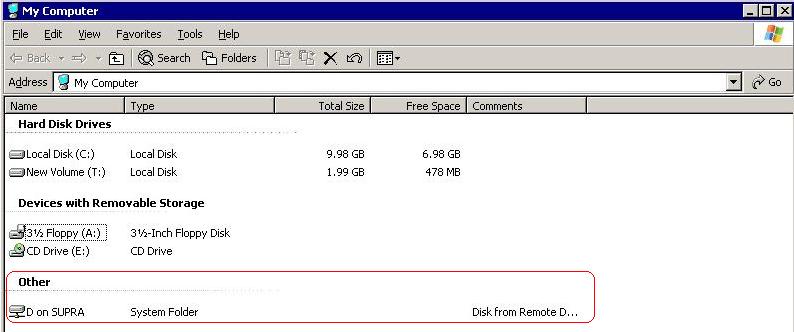
•    Buka menu “My Computer”  pada VPS anda
•    Lalu pilih file yang akan di share pada bagian “other”.
Updated on September 19, 2019

Was this article helpful?

Related Articles

Need Support?
Can't find the answer you're looking for?
Contact Support

Leave a Comment